 Museris
 AI Roleplay,
Without the Setup
Museris is the easy-to-use AI roleplay app you can run on any device. Create characters, craft worlds, and have conversations that go as deep as you want — with any AI model you already use, or with Museris Cloud built right in.
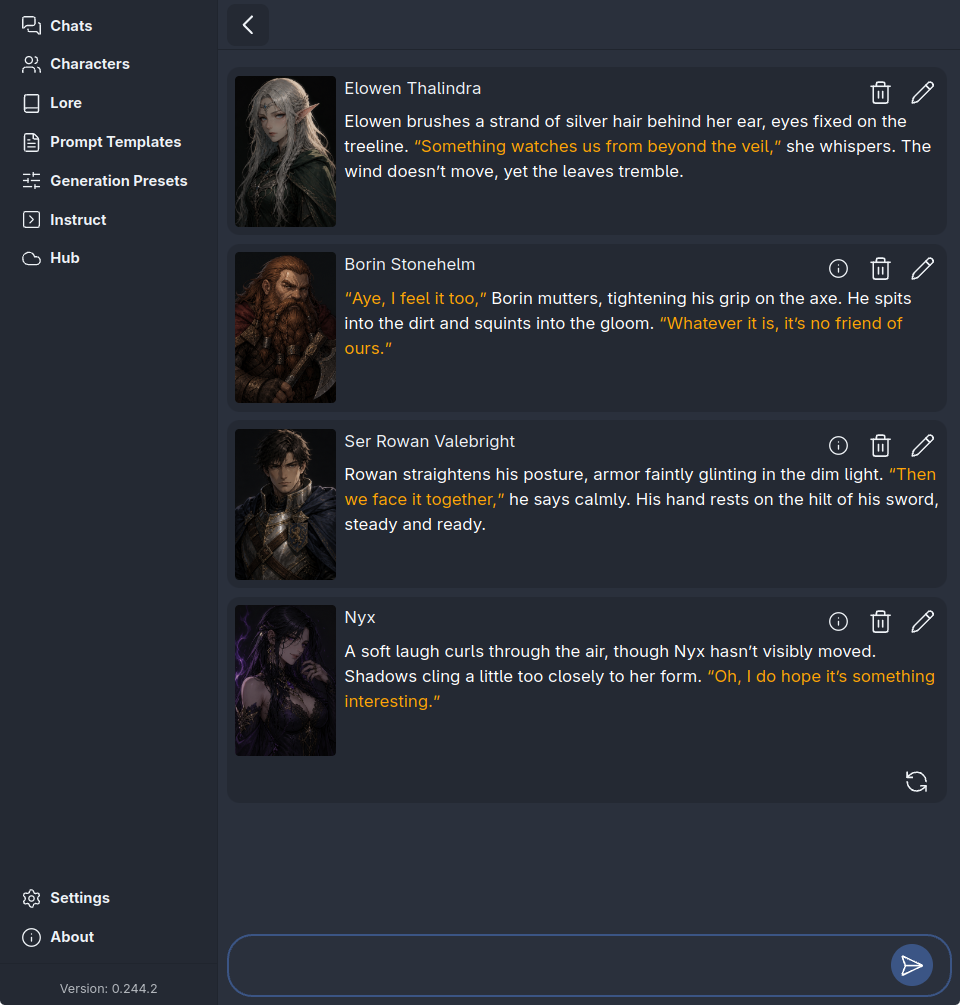
The app
What is Museris?
Museris is an AI roleplay app for writing stories with characters you create or discover. It gives you a place to build a cast, describe a world, choose an AI model, and continue a conversation across scenes. You can play one character opposite another, or step into a scene with several characters at once.
The app is available for Windows, macOS, Linux, and Android. Museris Hub is the companion community site where you can browse characters, download lorebooks, and find guides. You can start with a character from the community or create your own from a blank page.
Model connections
Bring your own model
Museris does not tie your stories to a single AI provider. Connect the service you already use, point the app at a model running on your own computer, or use Museris Cloud when you want a managed option.
Any OpenAI-compatible endpoint
If a provider offers an OpenAI-compatible API, you can add its endpoint and choose the model you want to write with. This includes local servers such as Ollama and LM Studio, along with hosted services that follow the same API shape.
- ✓ Use an endpoint you already control
- ✓ Save separate presets for different models
- ✓ Run a local server when you want to keep inference on your machine
Museris Cloud
Museris Cloud is the built-in option for people who would rather not set up a model server. Create an account, connect the app to Hub, and start a conversation without managing an endpoint yourself.
- ✓ No separate model server to configure
- ✓ Managed models available through your account
- ✓ Optional — local and third-party connections remain available
Setting up a local server? Read the Museris documentation.
Characters
Characters that stay in character
A character in Museris is more than a name and an avatar. Their profile can hold a biography, a way of speaking, relationships, and the details that make them recognizable from one scene to the next. The more clearly you describe those details, the more the AI has to work with when it writes a reply.
Character cards can be written in plain language or organized with Markdown and XML. You can import a PNG card from the wider roleplay community, create a new character in the app, or download one from Museris Hub and make it your own.
- ✓ Rich profiles with avatars, biographies, and custom greetings
- ✓ Character cards keep their identity across scenes and longer chats
- ✓ Import community-standard PNG character cards in seconds
- ✓ Browse and download characters from the Museris community
Group roleplay
A whole cast in one conversation
Some stories need more than two voices. Museris lets you bring several characters into the same conversation, so a group scene can include the whole cast instead of moving between separate one-on-one chats. The AI can choose who speaks next by reading the flow of the scene and the character whose reply fits the moment.
You are part of that cast too. Pick any character from your roster to play as, whether you created them yourself or downloaded them from the community. Characters respond to who you are in the scene, not only to the last line you typed.
- ✓ One-on-one chats and full group conversations
- ✓ AI-assisted speaker selection keeps group scenes moving
- ✓ Play as any character in your library
- ✓ Full markdown rendering and per-message guidance
Worldbuilding
Worlds that feel lived in
A convincing scene needs more than a character. It needs places, factions, history, and small details that make the world feel as though it existed before the conversation began. Lorebooks keep that information organized and ready when a scene calls for it.
You can attach a lorebook to the conversations that need it and leave it out of the ones that do not. Individual entries can be switched on or off, so a story can keep its focus without carrying every detail of the setting into every reply.
- ✓ Keep worldbuilding organized in separate lorebooks
- ✓ Add only the lore that matters to each chat
- ✓ Turn individual lore entries on or off as needed
- ✓ Download lorebooks from the Museris community
Local-first
Local-first by default
Your characters and conversations are part of your own library. Museris stores them on your device, so you can open the app and continue a story without depending on a Hub account. Cloud AI is an option, not a requirement for keeping your files.
Your library stays with you
Characters, lorebooks, and conversation history live in the app on your machine. You can keep different projects and return to them without rebuilding the setup each time.
Cloud when you choose it
Museris Cloud is there when you want a managed model connection. If you use a hosted AI service, that service receives the text it needs to write a reply.
Available where you create
Use Museris on Windows, macOS, Linux, and Android. iOS is planned next.
Want to keep inference on your own machine? Read the local inference guide.
Comparing your options
Museris vs SillyTavern
Both apps support AI roleplay, character cards, and connections to different models. Museris is built as an installable app with local-first storage and a cast that can share one conversation. SillyTavern offers a different setup and a deep extension ecosystem.
If you already have SillyTavern characters, you can bring their cards with you and start a fresh scene. The comparison covers installation, character cards, group conversations, model connections, and the parts that stay behind.
Compare Museris with SillyTavernGood to know
Frequently asked questions
Do I need an account to use Museris?
You can use the standalone Museris app without a Hub account. An account is only needed for Museris Cloud, which connects the app to managed models.
Can I use my SillyTavern character cards in Museris?
Yes. Museris supports character cards built for SillyTavern as well as its own character format. Import a PNG card to bring over the character details and greeting.
Does Museris work without an internet connection?
Your characters and conversations are stored on your device, so your library remains available offline. Writing new AI replies still requires a connection to an AI model, unless you run a model server locally.
Your next scene
Start your next story
Download Museris, choose a character, and go from install to first conversation in minutes. Bring a favorite card or create someone new.